
Indie Author Academy / Lessons
Which self-publishing platforms conflict on distribution
See which self-publishing platforms conflict across KDP, IngramSpark, Draft2Digital, and BookVault, covering ISBN clashes, Ingram feeds, and clean set-up.
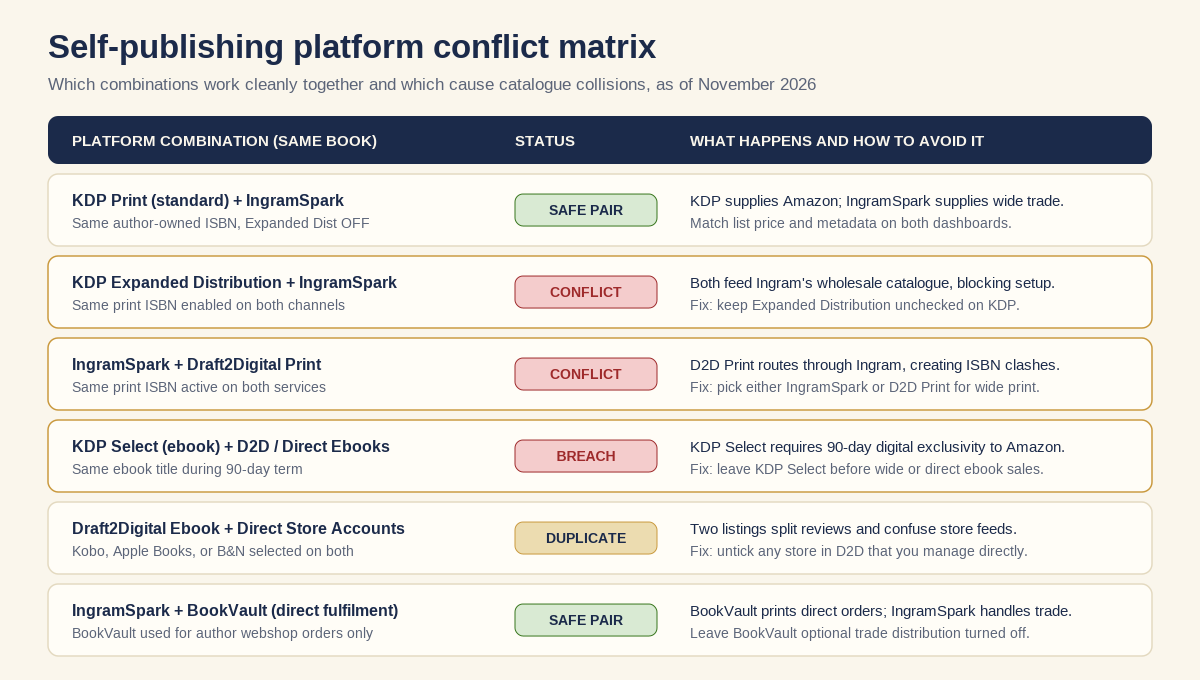
Self-publishing platforms conflict whenever two dashboards try to feed the same book into the same retailer or wholesale catalogue, or when an exclusivity agreement blocks wider sales. As of November 2026, the three most common collisions happen between KDP Expanded Distribution and IngramSpark, between IngramSpark and Draft2Digital Print, and between KDP Select and any non-Amazon ebook channel.
You do not need to restrict yourself to one dashboard to stay safe. Most experienced indie authors combine Amazon KDP, IngramSpark, Draft2Digital, and BookVault or direct fulfilment without a single listing clash. The secret is assigning every sales channel to exactly one upstream supplier and using author-owned ISBNs for print editions.
Where self-publishing platforms conflict in practice
Behind the colourful dashboards, book distribution relies on a surprisingly small number of wholesale pipes. Amazon runs its own closed retail ecosystem for Kindle and KDP Print, yet its Expanded Distribution option feeds outward into Ingram's wholesale catalogue. Draft2Digital Print also feeds into Ingram's wholesale catalogue. IngramSpark is owned by Ingram itself.
When two different platforms send the same 13-digit ISBN into Ingram's database, the system cannot tell which publisher owns the active feed. Setup fails with an error message stating the ISBN is already in use, or two competing records appear on retail sites, splitting reader reviews and causing buy-button glitches. On the ebook side, conflicts happen when an aggregator sends a title to a store you already manage directly, or when you forget that a book is locked inside Amazon's 90-day exclusivity programme.
KDP Expanded Distribution versus IngramSpark
This is the print conflict that trips up the highest number of authors. On the final pricing screen of an Amazon KDP paperback setup, there is a small checkbox labelled Expanded Distribution. According to Amazon KDP Expanded Distribution documentation, ticking that box allows Amazon to push your paperback into external wholesale channels, bookstores, and libraries at a 40% royalty minus print cost.
Because Amazon sends Expanded Distribution titles into the Ingram wholesale feed, enabling both KDP Expanded Distribution and IngramSpark global book distribution on the same paperback ISBN creates an immediate catalogue clash. If KDP Expanded Distribution reaches Ingram first, IngramSpark will reject your ISBN upload until you disable Expanded Distribution on KDP and submit a formal title transfer or clearance request to IngramSpark support, which can delay a launch by weeks.
Even if you use two separate ISBNs (for instance, KDP's free ISBN on Amazon and your own ISBN on IngramSpark), enabling KDP Expanded Distribution still creates two competing print editions of the same book in bookshop terminals and on Amazon search results. The clean fix is simple: always leave KDP Expanded Distribution unticked if you plan to use IngramSpark now or in the future. For a deeper comparison of royalties and fees between both services, read our guide to IngramSpark vs KDP for indie authors.
IngramSpark versus Draft2Digital Print
Draft2Digital is best known as an ebook aggregator, yet it also runs Draft2Digital Print for paperbacks. Many authors assume that adding Draft2Digital Print on top of IngramSpark will unlock extra bookshops. As of November 2026, it does the exact opposite.
Draft2Digital Print distributes paperbacks through Ingram's wholesale network. Enabling both Draft2Digital Print and IngramSpark on the same print ISBN attempts to register one book inside Ingram twice, causing rejected uploads or duplicate retail listings. You must pick one wide print partner per edition:
- Pick IngramSpark if you want full control over wholesale discounts (40% to 55%), returnability settings, hardcover options, and direct publisher compensation minus print cost and the 1.875% market access fee.
- Pick Draft2Digital Print if you want a single simple dashboard for both ebook and basic paperback distribution and prefer not to manage IngramSpark's separate trade controls.
If you previously published a paperback through Draft2Digital Print and want to move that ISBN to IngramSpark, unpublish the print edition inside Draft2Digital first and confirm in writing that the ISBN has been released from Ingram's catalogue before uploading files to IngramSpark.
KDP Select versus Draft2Digital and direct ebook sales
Print conflicts are technical; ebook conflicts are contractual. When you enrol a Kindle ebook in KDP Select (which puts the book into Kindle Unlimited), you sign a 90-day digital exclusivity agreement with Amazon. During those 90 days, the ebook cannot be sold, given away, or distributed digitally anywhere else, including Apple Books, Kobo, Barnes & Noble, Google Play, library apps via Draft2Digital, or your own website.
The only digital excerpt Amazon permits outside Kindle during KDP Select is a sample of up to 10% of the book. Breaking exclusivity by leaving an old Draft2Digital listing live or keeping an EPUB buy button active on your website can trigger an automated warning from KDP, withheld royalties, or account termination.
Before moving an ebook wide or launching direct sales, switch off auto-renew inside KDP Select, wait until the final day of the 90-day term expires, and only then publish on Draft2Digital or open your direct checkout. Remember that KDP Select never restricts print formats: your paperback and hardcover can go wide on IngramSpark and sell direct on day one. Our breakdown of KDP Select or going wide per book helps you decide which titles belong in Kindle Unlimited and which earn more wide.
Avoiding duplicate ebook listings across aggregators
A quieter ebook conflict happens when authors upload directly to Kobo Writing Life, Apple Books, or Barnes & Noble Press and then upload the same manuscript to Draft2Digital without unchecking those stores. As explained in the Draft2Digital FAQ, you control distribution store by store via checkboxes. If you already maintain a direct account with Apple Books or Kobo, untick Apple and Kobo inside Draft2Digital so each store receives one clean file. You should also untick Amazon inside Draft2Digital because publishing directly on KDP pays higher royalties and gives you full access to Amazon Ads and KDP reporting. See our walkthrough on setting up retailer links on Apple Books, Kobo, Google Play, and Barnes & Noble for exact store checkboxes.
Shared ISBN rules and pricing override clashes
ISBN ownership decides whether platforms cooperate smoothly or fight over your listing. Every free platform ISBN is tied to the platform that issued it. A free KDP ISBN carries Amazon's Independently Published imprint and cannot be typed into IngramSpark. A free Draft2Digital ISBN works only through Draft2Digital. A free IngramSpark US ISBN carries the Indy Pub imprint and works only on IngramSpark.
Buying your own block of ISBNs from your national agency solves that lock-in completely. You assign one ISBN to your paperback format and enter that exact same number on both Amazon KDP (with Expanded Distribution off) and IngramSpark. Because both platforms report the same 13-digit identifier, Amazon merges the record onto one clean product page and prints customer orders through KDP rather than buying from Ingram. For exact UK and US registration steps, check our guide to ISBNs for self-published authors in the UK and US, or review Amazon KDP Book Details guidance on matching metadata fields.
How pricing overrides create buy-button trouble
Even with one shared ISBN, setting two different retail prices across KDP and IngramSpark causes headaches. Suppose you price your paperback at $14.99 on KDP and $13.99 on IngramSpark. Retailers scrape competitor prices automatically. Amazon's price-matching algorithm can drop your KDP listing to match the lower IngramSpark feed, shrinking your KDP royalty unexpectedly, or temporarily hand the buy button to a third-party seller feeding from Ingram.
Keep your paperback title, subtitle, author name, trim size, page count, and retail list price identical across KDP and IngramSpark in every shared currency (USD, GBP, EUR, CAD, AUD). Whenever you update a price or run a permanent price drop, update both dashboards on the same afternoon.
Where BookVault fits without creating duplicates
Direct-to-reader print fulfilment has grown quickly because authors want higher margins and direct customer emails without stacking fifty cartons in a spare bedroom. BookVault print-on-demand fills that gap by printing single paperbacks and hardcovers in the UK and US and shipping them straight to readers who buy through your website.
BookVault also offers optional retail distribution feeds into UK and US trade channels. That optional toggle is where a conflict can creep in. If your paperback is already live on IngramSpark for wide trade distribution, turning on BookVault's optional trade distribution creates overlapping wholesale feeds for the same edition.
The conflict-free rule for BookVault is clear: use BookVault strictly for direct website fulfilment (connecting to your online shop or author platform) and leave its optional wholesale distribution switched off while IngramSpark handles retail trade. That gives you crisp sprayed-edge or bespoke direct editions through your website alongside clean global bookstore ordering via IngramSpark. If you prefer signing and posting stock yourself, read our tutorial on how to sell signed paperbacks direct from your website.
A clean multi-platform architecture with zero conflicts
Putting every rule together produces a simple three-lane map that handles ebooks, trade print, and direct reader orders with zero catalogue overlaps. You can adopt the full map at launch or add lanes gradually as your catalogue grows.
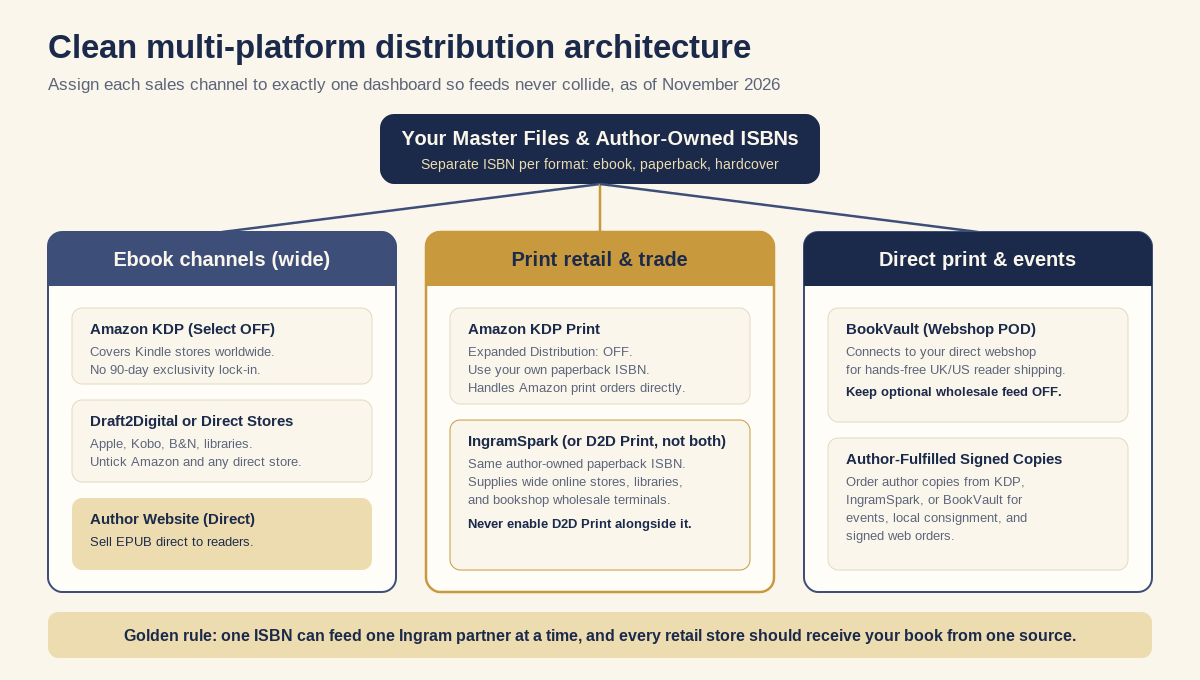
| Format and channel | Assigned platform | Key setting to check |
|---|---|---|
| Kindle ebook (Amazon) | Amazon KDP | KDP Select OFF if selling wide or direct |
| Wide ebooks (Apple, Kobo, B&N, libraries) | Draft2Digital or direct store accounts | Untick Amazon and any store managed directly |
| Direct ebooks (author website) | Direct storefront checkout | Active only when KDP Select is OFF |
| Amazon paperback and hardcover | Amazon KDP Print | Author-owned ISBN; Expanded Distribution OFF |
| Wide print (bookshops, libraries, online stores) | IngramSpark (or D2D Print, never both) | Same author-owned ISBN; matching cover price |
| Direct paperbacks and signed copies | BookVault (direct only) or self-fulfilled | Optional BookVault wholesale distribution OFF |
If you want to run direct digital sales alongside those retail channels without stitching together separate checkout plugins, Indie Author Toolchest includes direct ebook sales on its subscription plan ($12.99/month or $120/year, with a 14-day free trial and no card needed, and direct sales switch on when subscribing); you can also read our general guide to selling ebooks direct to compare storefront approaches.
Before your next upload, open a simple spreadsheet with one row per ISBN and one column per retailer or wholesaler. Write the single dashboard responsible for every cell, verify that KDP Expanded Distribution and Draft2Digital Print are not colliding with IngramSpark, and check KDP Select expiry dates before activating any wide ebook checkbox.
Questions, answered
Can I publish the same paperback on both Amazon KDP and IngramSpark?
Yes, you can publish the same paperback on KDP and IngramSpark using the same author-owned ISBN, provided you leave KDP Expanded Distribution switched off. KDP handles Amazon retail orders directly, while IngramSpark supplies bookshops, libraries, and other online retailers without feeding a duplicate wholesale record into Ingram.
What happens if I enable both IngramSpark and Draft2Digital Print on one ISBN?
Both IngramSpark and Draft2Digital Print distribute paperbacks through Ingram's wholesale network, so uploading the same ISBN to both services triggers an ISBN conflict or creates duplicate trade listings. Choose either IngramSpark or Draft2Digital Print for wide print distribution, never both on the same edition.
Does KDP Select stop me from distributing my paperback wide on IngramSpark?
No. KDP Select exclusivity applies only to the digital ebook edition during each 90-day enrolment period. You remain free to publish your paperback, hardcover, and audiobook through IngramSpark, local bookshops, or your own website while the ebook is enrolled in KDP Select.
Can I use BookVault alongside KDP and IngramSpark without creating duplicates?
Yes. Use BookVault strictly for direct-to-reader fulfilment linked to your own website storefront while keeping BookVault's optional UK or US trade distribution turned off. That gives you automated direct print shipping without clashing with your IngramSpark wholesale catalogue entry.
Why does Amazon sometimes show my paperback as out of stock when I use KDP and IngramSpark together?
Mismatched list prices, mismatched metadata, or publishing on IngramSpark long before KDP can cause Amazon's system to pull the Ingram wholesale listing instead of your KDP print file. Keep the title, author name, trim size, and retail price aligned across both platforms, and leave KDP Expanded Distribution turned off.