
Indie Author Academy / Lessons
Amazon KDP upload limits and rules for indie authors
Understand Amazon KDP upload limits as of November 2026: two new titles per format each week, Sunday UTC resets, exempt edits, and safe launch schedules.
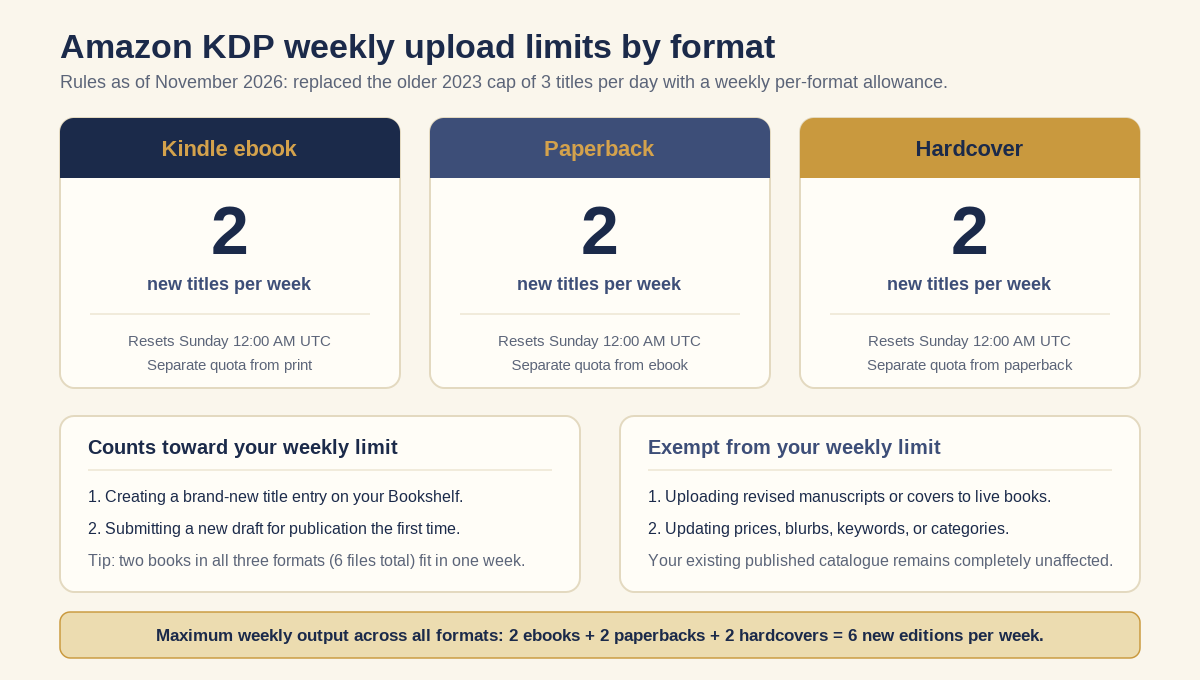
As of November 2026, Amazon KDP upload limits allow indie authors to create and submit up to two new titles per week in each book format: two Kindle ebooks, two paperbacks, and two hardcovers. That weekly per-format cap replaced Amazon's older 2023 limit of three titles per day and resets every Sunday at 12:00 AM UTC. Edits to already submitted books and your existing published catalogue do not count toward the limit.
For an author publishing two to six novels a year, this cap rarely interferes with day-to-day work. Where indie authors run into unexpected delays is during multi-book backlist migrations, rapid-release series launches, translated catalogue rollouts, or large-print and hardcover expansions uploaded in a single weekend. Planning your title creation calendar around the Sunday UTC reset keeps every release on schedule without risking blocked uploads.
What changed in Amazon KDP upload limits
In September 2023, Amazon introduced a daily ceiling of three newly published titles per day to slow down automated low-content notebooks and mass-produced AI spam. That older daily cap still permitted up to 21 uploads per week, which left ample room for bulk uploaders to flood storefronts. By autumn 2026, Amazon replaced that daily limit with the much tighter weekly per-format rule now in force across KDP.
Under the current rules documented across Amazon KDP Help and tracked in our summary of KDP changes in 2026 for indie authors, your account receives three separate weekly buckets:
- Up to two new Kindle ebooks per week.
- Up to two new paperbacks per week.
- Up to two new hardcovers per week.
Every bucket resets simultaneously at Sunday 12:00 AM UTC (midnight Greenwich Mean Time, which is Saturday evening across North American time zones). Publishing two complete books in all three formats during a single week consumes six total editions and sits completely inside the rules. Attempting to upload a third new ebook or a third new paperback before Sunday midnight UTC hits the cap immediately.
What counts toward the weekly cap and what stays exempt
Confusion around Amazon KDP upload limits usually stems from mixing up initial title creation with routine catalogue maintenance. Amazon applies the weekly quota to creating new title entries and submitting them for publication the first time, including drafts that were saved earlier and submitted later. Once a title has cleared its first submission, ongoing updates stay exempt.
Use the reference table below before planning a busy Bookshelf session:
| KDP Bookshelf action | Counts toward weekly cap? | Practical note for authors |
|---|---|---|
| Creating a brand-new ebook, paperback, or hardcover entry | Yes | Uses 1 of your 2 weekly slots for that format |
| Submitting a previously saved draft for the first time | Yes | First-time submission counts in that week's bucket |
| Uploading a revised manuscript or cover to a live book | No | Unlimited file corrections for typos or updated covers |
| Editing blurb, price, categories, or backend keywords | No | Safe to optimise metadata across your whole backlist |
| Uploading final files to an already submitted ebook pre-order | No | Complete before KDP's 72-hour pre-order lock deadline |
| Creating a large-print paperback, box set, or translation | Yes | Counts as a separate new title in its format bucket |
Always review Amazon KDP publishing timelines alongside the weekly cap. Even when you have open weekly slots, new paperbacks, hardcovers, and ebooks can take up to 72 hours (and occasionally longer during busy retail periods) to pass KDP's automated and manual review queues.
How the cap affects multi-format launches and rapid releases
Different indie publishing models experience the two-per-format limit very differently. Walking through four real-world scenarios shows exactly where bottlenecks appear:
- Single-book multi-format launch: You release one novel simultaneously as a Kindle ebook, paperback, and hardcover. That uses 1 of 2 ebook slots, 1 of 2 paperback slots, and 1 of 2 hardcover slots, leaving room for a second complete book in the same week.
- Standard rapid release (one book every 30 days): Because each book launches in a different calendar month, you never come close to the weekly limit.
- Reverting rights or migrating a six-book backlist: If you regain rights from a small press and want to republish six books in ebook and paperback, you cannot upload all six in one weekend. At two per format per week, migrating six titles cleanly requires three consecutive weekly windows (Weeks 1, 2, and 3).
- Standard paperback plus large-print paperback for two books: Because both editions sit inside the Paperback format bucket, creating standard and large-print paperbacks for two books equals four new paperback titles. You must split those across two Sunday UTC resets, launching Book 1 in both print trims in Week 1 and Book 2 in Week 2.
Notice how the same rule applies to omnibuses and translated catalogues. If you publish a trilogy plus a three-book box set in ebook and paperback during the same launch week, that equals four ebooks and four paperbacks, double the weekly limit. Staggering title creation ahead of your promotional push avoids last-minute panic.
Building a safe rapid-release and migration calendar
The cleanest way to work smoothly within Amazon KDP upload limits is to separate title creation from final manuscript polish. Suppose you are preparing a four-book rapid release (or migrating a four-book series) across ebook, paperback, and hardcover. Rather than waiting until release week, map your Bookshelf work across four calm calendar weeks.
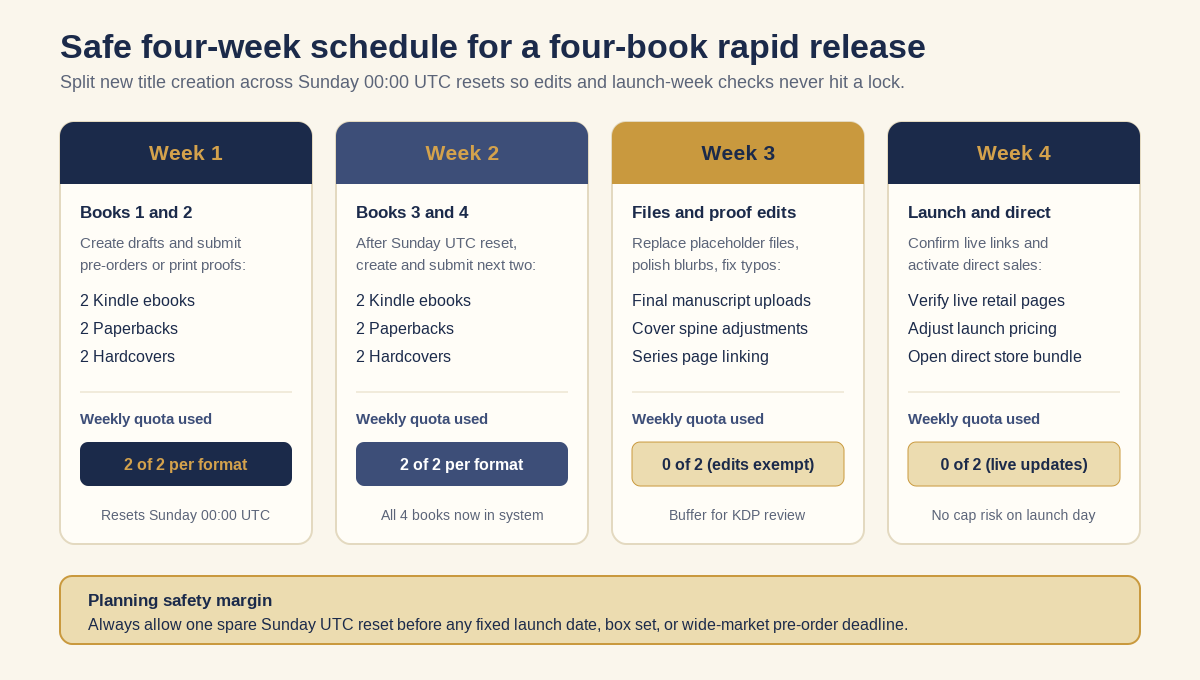
Follow this four-week schedule for any four-book multi-format rollout:
- Week 1: Create and submit Book 1 and Book 2 in Kindle ebook (as pre-orders if you are staggering release dates), paperback, and hardcover. That uses 2 of 2 slots per format before the Sunday 00:00 UTC reset.
- Week 2: After Sunday midnight UTC, create and submit Book 3 and Book 4 across ebook, paperback, and hardcover. All four titles across all twelve editions are now safely inside KDP's system.
- Week 3: Upload final proofread manuscripts, swap tweaked paperback spine files after checking physical proof copies, tighten your blurbs, and link all four titles on your Amazon Series Page. Because every edit sits on an already submitted title, you use zero weekly slots.
- Week 4: Confirm all live retail links, verify pricing bands and category placement using our guide on how to choose KDP keywords and categories, and open your direct-store bundle alongside the retail launch.
Always build at least one spare Sunday UTC reset between your final planned new title creation and any immovable external commitment such as a newsletter promo slot, podcast interview, or physical launch event. If a cover file gets rejected for trim margins or you realise you need a bonus companion edition, that spare week absorbs the delay effortlessly.
Checking UTC reset times and preventing wasted draft slots
Because KDP resets every weekly bucket at Sunday 12:00 AM UTC rather than your local midnight, verify the local conversion before uploading late on a Saturday. In the UK during winter (GMT), midnight UTC equals midnight Saturday into Sunday, whereas during British Summer Time (BST) the reset lands at 1:00 AM Sunday. Across North America, Sunday 00:00 UTC falls on Saturday evening (for example, 7:00 PM EST or 4:00 PM PST), while in Sydney it arrives mid-morning on Sunday.
Run a quick pre-upload check before clicking Create so you never burn a weekly slot on a duplicate or scrapped draft. Confirm your final trim size, ISBN assignment, imprint name, and paper colour before creating a paperback or hardcover entry, because KDP locks trim size and ISBN once published and forces you to create a brand-new title entry if you want to change them later.
Avoid tripping KDP quality reviews while working near the cap
Amazon tightened upload limits specifically to deter bulk publishing behaviour, so publishing right up against the two-per-format ceiling every single week deserves extra care. Guidance from the ALLi Self-Publishing Advice Center and Amazon KDP Content Guidelines highlights several avoidable mistakes that trigger manual account reviews:
- Never create multiple KDP accounts to double your weekly upload allowance, because Amazon strictly prohibits duplicate publisher accounts and terminates linked accounts permanently.
- Never upload gibberish placeholder text or blank files simply to reserve a pre-order slot, as KDP requires genuine manuscript content and enforces strict pre-order deadlines.
- Disclose AI-generated text, images, or translations honestly in the KDP publication form whenever required under current guidelines.
- Double-check that titles, subtitles, author names, and cover art contain zero keyword stuffing or misleading claims that could trigger automated blocking during submission.
Clean files, accurate metadata, and steady, human-paced publishing schedules clear KDP's review queues far faster than rushed last-minute uploads. If a newly published title stalls after going live, diagnose discoverability calmly using why a book is not selling and how long to wait rather than hastily deleting and re-uploading a fresh edition that wastes another weekly slot.
Why owning a direct sales fallback protects your schedule
The shift from three titles a day in 2023 to two titles per format a week in 2026 illustrates a permanent truth of independent publishing: any third-party retailer can tighten its upload caps, royalty rules, or review windows overnight. You should absolutely comply with KDP's limits while Amazon remains a major sales channel, yet your entire publishing calendar should never depend on one store's weekly gate.
When you maintain your own email list and direct checkout, you decide when to release bonus novellas, omnibus box sets, annotated editions, or early-access digital drops to your superfans with zero weekly upload caps and higher per-copy margins. Our guide on what you still own if Amazon closed your KDP account lays out the core assets every indie author should hold independently, and tracking book sales and return on investment shows how to measure direct income beside KDP royalties.
Remember that if your ebooks are enrolled in KDP Select, exclusivity rules restrict selling those specific ebook files elsewhere during each 90-day term, while print books, non-Select ebooks, and direct bundles remain completely open (covered on our sell ebooks direct page). If you want an author website, mailing list, and direct sales in one place, Indie Author Toolchest costs $12.99 a month or $120 a year with a 14-day free trial and no card required, and direct sales switch on when you subscribe. Audit your next six months of planned editions against the Sunday 00:00 UTC reset calendar today so every format clears KDP smoothly and your readers always have a direct way to buy from you.
Questions, answered
How many books can I publish per week on Amazon KDP as of November 2026?
You can create and submit up to two new titles per week in each book format: two Kindle ebooks, two paperbacks, and two hardcovers. Across all three formats combined, that equals up to six new editions per calendar week. The weekly allowance resets every Sunday at 12:00 AM UTC.
Do edits to existing KDP books count toward the weekly upload limit?
No, updates to titles you have already submitted or published do not count against your weekly cap. You can freely upload corrected manuscripts, swap updated covers, rewrite book descriptions, adjust retail pricing, or refine backend keywords on your backlist at any time. Your existing live catalogue is completely unaffected by the limit.
Can I publish an ebook, paperback, and hardcover of the same book in one week?
Yes, because the weekly limit applies separately to each book format rather than across all formats combined. Launching one novel simultaneously in Kindle ebook, paperback, and hardcover uses only one of your two weekly slots in each format. You could even publish two complete books across all three formats during the same week.
What happens if I hit the KDP weekly upload limit before a scheduled launch?
KDP will temporarily block you from creating or submitting additional new titles in that format until the next reset at Sunday 12:00 AM UTC. You cannot request a routine manual override for standard indie publishing schedules, and opening a second KDP account to bypass the limit violates Amazon's terms and risks account termination. Building a one-week buffer into your upload calendar prevents missed launch dates.
Do translations and large-print editions count as new titles under the KDP limit?
Yes, every separate language edition, box set, or large-print paperback requires its own title entry on your KDP Bookshelf and counts toward that format's weekly allowance of two new titles. If you are migrating a multi-book translated backlist or launching both standard and large-print paperbacks, space the initial title creations across consecutive Sunday UTC resets.