
Indie Author Academy / Lessons
How to run your first TikTok Live as an indie author
Run your first TikTok Live as an indie author with a 40-minute run sheet, low-viewer talking points, eligibility checks and a clear free-chapter offer.
To run your first TikTok Live as an indie author, plan a structured 40-minute broadcast built around one visible desk activity, a three-minute book reading and a single bio-link offer. Most nervous first-time hosts fail because they press go with nothing to do while waiting for comments. Giving your hands a clear task lets you speak calmly to an empty or quiet chat while BookTok viewers drift in from the feed.
Before you schedule a date, confirm your account qualifies for live streaming, set your phone at eye level beside a physical copy of your book and write five short talking prompts on a sticky note. That small amount of preparation turns an awkward silence into a repeatable reader-discovery habit that feeds your email list and direct shop.
Who can host a TikTok Live as an indie author?
Checking access requirements comes first so you do not announce a broadcast your account cannot launch. As of November 2026, TikTok Support guidance on TikTok LIVE states that hosts must meet minimum age rules, which are 18 and over in most regions to stream and use gifts, along with account eligibility criteria. For standard creator accounts, the usual follower threshold is 1,000 followers, though regional policies and approved TikTok Shop seller status can alter exact access.
Open the TikTok app, tap the plus icon at the bottom of the screen and swipe across the bottom menu past Video and Photo. If the LIVE option appears, your account already qualifies. If it does not appear yet, verify your current eligibility inside TikTok Support rather than trusting outdated social posts, and keep posting short BookTok clips until the toggle unlocks. Our guide to social media for authors and BookTok covers how to build steady momentum with three short posts a week.
You also need a clickable link in your profile before going live so interested viewers have somewhere clear to tap. Depending on your follower count and whether you use a Personal or Business account, link-in-bio rules differ, so test your profile link from a second phone or a logged-out browser before broadcast day. One focused landing page outperforms a crowded menu of twelve links because every extra tap loses distracted mobile viewers.
How to set up your desk, lighting and pinned comment
Scrolling TikTok users decide within two seconds whether a live stream looks worth tapping. You do not need expensive cameras or studio lamps, yet a clean frame signals professionalism immediately. Position your phone vertically on a tripod or sturdy stack of books so the lens sits at eye level, looking straight ahead rather than up from your desk.
Face a daylight window if you stream during the afternoon, or place a warm desk lamp slightly behind your phone if you broadcast in the evening. Keep a bright light source behind you switched off, otherwise your face turns dark and your book cover disappears into glare. Prop one or two physical copies of your novel on a small display stand behind your shoulder or within easy reach on the table so every viewer spots the genre and title without asking.
Sound clarity matters more than camera sharpness. Close nearby windows, silence alerts and record a ten-second test clip from your chair before going live. If the room echoes, stream near curtains or bookshelves to soften the sound.
Prepare three short items in a notes document ten minutes before starting so you can copy them fast:
- Your broadcast title, under 30 characters so it stays readable, such as "Indie fantasy author Q&A" or "Signing romance paperbacks".
- Your pinned comment naming your genre and offer, such as "Cosy mystery author here! Grab chapter 1 free via my bio link."
- Five written fallback prompts on an index card beside the lens so your eyes stay near the camera when chat pauses.
Pin your prepared comment in the first thirty seconds. New viewers join mid-sentence and need instant context; a pinned note tells lurkers what you write and where to grab the free sample without interrupting you.
The 40-minute run sheet for your first broadcast
Going live without a clock invites either a rushed five-minute exit or a rambling two-hour slog. A 40-minute schedule gives the feed time to send genre readers into your room while protecting your energy. According to the TikTok Creator Portal, clear structure and early hooks help viewers understand a room and stay longer.
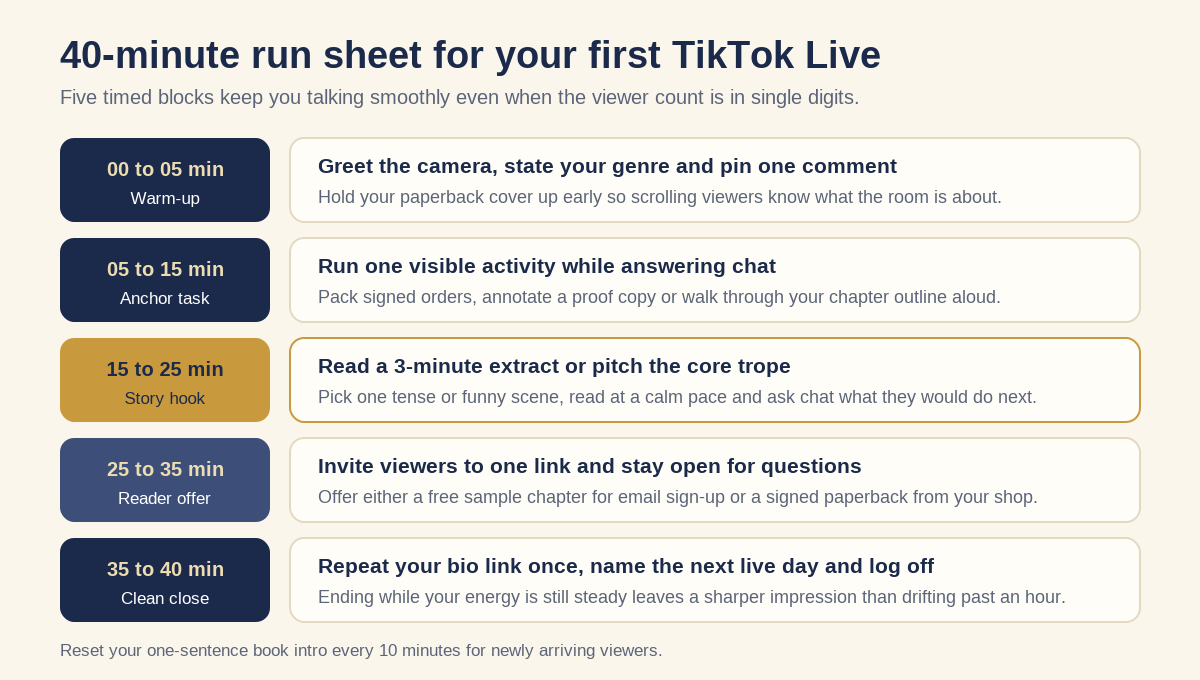
Follow these five timed blocks, pausing whenever a viewer asks about your characters or process:
| Time window | Primary focus | Exact host action |
|---|---|---|
| Minutes 00 to 05 | Warm-up and orientation | Smile into the lens, state your genre and premise, pin your link comment and begin your desk task. |
| Minutes 05 to 15 | Visible anchor activity | Pack signed orders, tab scenes in a proof copy or walk through a chapter outline while answering chat. |
| Minutes 15 to 25 | Three-minute reading | Show the cover, state the core conflict in two lines, read one crisp scene and ask chat a reaction question. |
| Minutes 25 to 35 | Soft offer and Q&A | Mention your free chapters or signed shop once clearly, then discuss books you have read lately. |
| Minutes 35 to 40 | Clean wrap-up | Thank viewers, repeat your bio link once, name your next live day and log off cleanly on time. |
Saving the reading for minute fifteen works better than reading immediately. Viewer numbers build gradually over the first quarter-hour as TikTok tests your stream with batches of BookTok users, so waiting lets more readers hear your strongest scene.
What to say when the chat is quiet or empty
Every indie author dreads seeing "1 viewer" or "0 comments" on screen. Remember that the viewer counter often lags behind silent feed watchers, and lurkers leave fast if a host stares silently saying "Waiting for people to join."
Speak from second one as though three friendly readers are listening over tea. Your visible anchor activity carries quiet stretches smoothly. Reliable tasks include:
- Packing signed paperbacks on camera while explaining the bookmarks or postcards tucked inside each parcel.
- Tabbing favourite scenes, clues or research notes inside a proof copy with coloured flags.
- Running a twenty-minute writing sprint where you state your scene goal, type with a visible timer and debrief afterwards.
- Unboxing proofs or sorting a genre shelf while recommending three indie books in your niche.
Every ten minutes, give a calm twenty-second reset for new arrivals: "If you have just joined, welcome. I am Alex, I write historical mysteries set in Victorian Edinburgh, and today I am tabbing clues in book one before a short reading at twenty past."
When someone types "Hi", greet them by name and ask a quick question such as "Are you reading anything good this week?" Simple prompts start chat much faster than asking strangers to quiz you about an unfamiliar novel.
How to pitch a free chapter or signed copy without pushing
Viewers leave broadcasts that sound like hard-sell shopping channels, yet forgetting to mention your book wastes the hour. As Written Word Media notes in its BookTok advice, readers respond to genuine enthusiasm and trope conversations rather than stiff adverts.
Pick one clear call to action per stream. Authors with one to three books usually gain more long-term value from offering free opening chapters for an email address, while authors holding stock often highlight signed copies during a packing session. See our guides to reader magnet ideas and selling signed paperbacks direct from your website to set up either offer first.
Tie your invitation straight to what viewers just saw:
- After your reading: "That scene stops right before the letter arrives in chapter two. Chapters 1 to 3 are free via the link in my bio."
- While signing stock: "I am packing Friday's post now. If you collect signed indie paperbacks with character art, my direct shop is in my bio."
- Before closing: "I stream every Thursday at 7pm UK time. Grab the free prequel in my bio if you want launch reminders for book two."
Mention your link two or three times across 40 minutes, spaced fifteen minutes apart. That rhythm stays polite while catching viewers who arrive halfway through.
What realistic viewer-to-reader numbers look like
Measuring a first stream against huge BookTok creators guarantees disappointment. A small room with five to twelve people watching at once still builds genuine readership when your profile link leads to one focused signup page.
The worked example below shows how the maths behaves on a modest 40-minute broadcast. These figures are a hypothetical worked example to illustrate each step, not a guaranteed average.
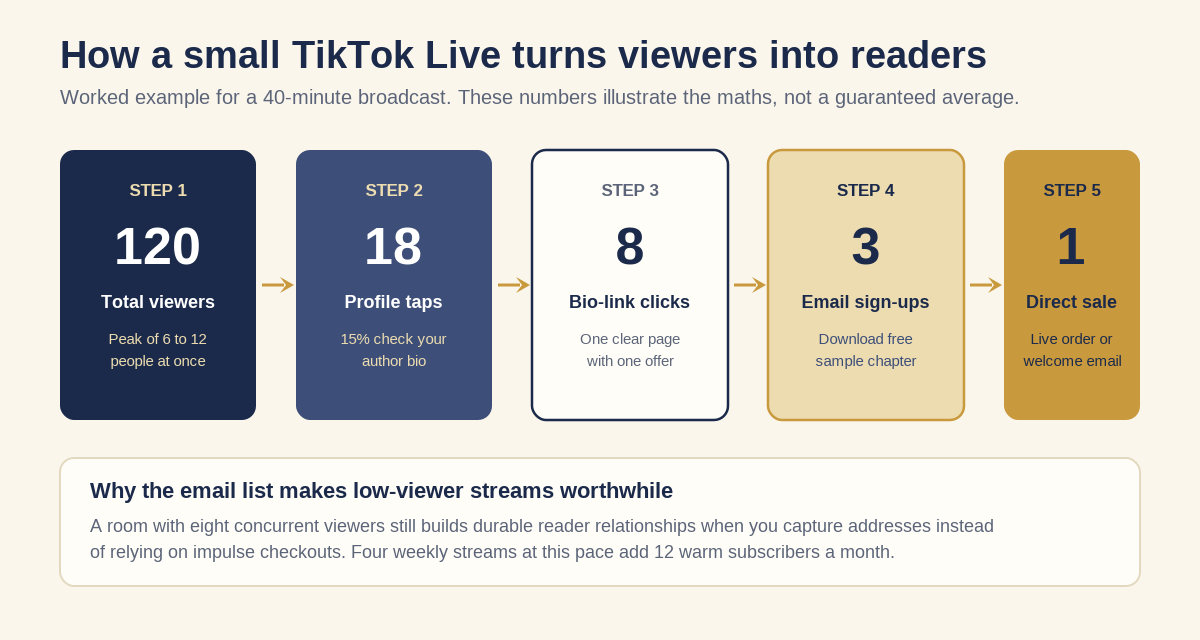
Suppose 120 unique viewers pass through your room over 40 minutes, peaking at 8 to 10 people at once. If 15% tap your profile, that produces 18 bio visits. If roughly half tap your single bio link, 8 people open your reader-magnet page, and at a 35% to 40% signup rate, 3 join your list. Over the next fortnight, your welcome emails introduce your full novel and convert 1 of those 3 readers into a direct ebook or paperback buyer.
Repeat that 40-minute stream weekly and that worked pace adds 12 warm subscribers and 4 direct orders a month with zero ad spend. Tracking every step shows exactly what to adjust: low profile taps mean your cover or pinned comment needs clarity, whereas clicks without sign-ups point to a cluttered landing page.
Platforms such as Indie Author Toolchest ($12.99 a month or $120 a year, with a 14-day free trial and no card required, and direct sales turned on when you subscribe) let you run a single clean author landing page for free chapters and direct checkout on one subdomain, or you can pair any mailing signup form with your direct ebook storefront.
What to do in the 24 hours after you end the stream
Your first broadcast creates useful assets after you log off. Straight after ending, open TikTok Live Centre analytics and log four figures in a spreadsheet: total unique viewers, peak concurrent viewers, average watch time and new followers. Compare those figures against new email sign-ups logged during the same two-hour window.
Within 24 hours, download your live replay from Live Centre, clip your cleanest 25-second book pitch or scene extract, add captions and post it to your main feed with a short trope hook. Viewers who missed the broadcast discover your book, and live attendees recognise you immediately.
Reply to comments or messages from the stream, and verify that your welcome sequence fired cleanly for every new subscriber. Our walkthrough on the first six author newsletter emails explains how to turn fresh live viewers into repeat readers. Lock in the same weekday and time for your second broadcast next week so regulars know when to return.
Questions, answered
How many followers do you need to go live on TikTok as an author?
As of November 2026, standard TikTok LIVE access typically requires 1,000 followers and a minimum age of 18 in most regions, though exact thresholds vary by country and TikTok Shop seller status. Check your own account eligibility inside the TikTok app and on TikTok Support before scheduling a broadcast.
How long should a first author TikTok Live last?
Aim for 35 to 45 minutes on your first broadcast. That window gives TikTok enough time to route scrolling BookTok viewers into your room while staying short enough to keep your energy steady and avoid rambling.
What should an author do if nobody is chatting during a TikTok Live?
Keep your hands busy with a visible anchor task such as packing signed copies, annotating a proof copy or sketching a chapter outline while narrating what you are doing. Reset your one-sentence book pitch every ten minutes because silent viewers often watch from the feed before tapping in.
Should you pitch your Amazon page or your email list on TikTok Live?
Directing viewers to a single landing page with a free first chapter or a direct signed-paperback shop usually retains more readers than sending them to a crowded retail search. Capturing an email address lets you follow up with your full backlist after the stream ends.
Do you need professional lighting or a ring light to host a TikTok Live?
You do not need studio gear to start. Facing a natural window or placing a warm desk lamp behind your phone lights your face and paperback cover clearly, provided your phone stays steady on a stand and your microphone picks up clean speech.